
Informative Design
Overview
I apply informative design across a wide range of projects, from subtle visual cues that improve clarity and cohesion to structured guides that align teams and workflows. I’ve used informative design to create clear documentation, establish consistent design standards, and teach beginners new information and practical skills.
This page breaks down how I’ve applied informative design in my work, highlighting examples that show how thoughtful organization and visual clarity can support understanding, learning, and collaboration.
Informative design through Articulate Rise360


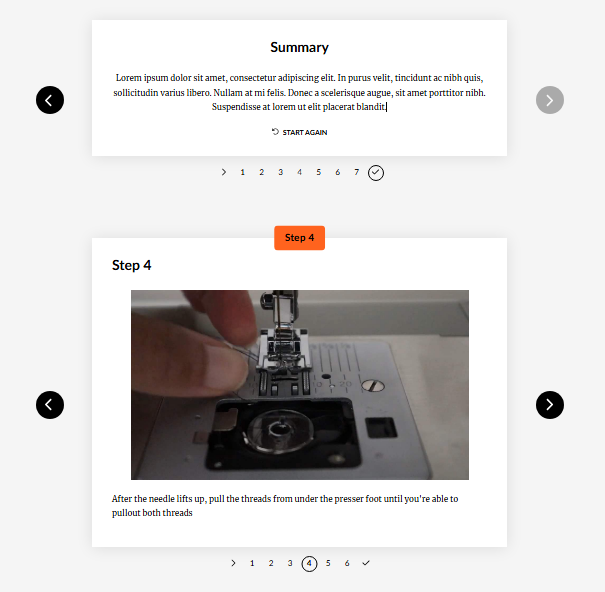
I used Articulate Rise 360 to design a beginner-friendly sewing guide that breaks the learning process into simple, structured lessons. The course introduces foundational concepts such as understanding the sewing machine, loading thread and bobbins, and basic operation through step-by-step explanations and visual support.
Rise’s modular layout allowed me to present information in short, digestible sections, making the content easy to follow for first-time learners. Interactive elements and knowledge checks reinforce key concepts, supporting confidence and comprehension as learners progress through the course.
Model Scale Guide for Volcanewt
For the Volcanewt project, I created a model scale and reference guide to ensure consistency across the asset pipeline from Maya to Unreal Engine. This guide defined standardized units, proportions, and export settings, helping artists maintain accurate scale when modeling assets in Maya and importing them into Unreal Engine.
By documenting scale references, scene setup, and best practices, the guide improved cohesion across the project and reduced iteration issues during integration. It also served as an onboarding resource, allowing team members to quickly align with established technical and visual standards.


